
Photoshop Lady
Your Favourite Photoshop Tutorials in One Place
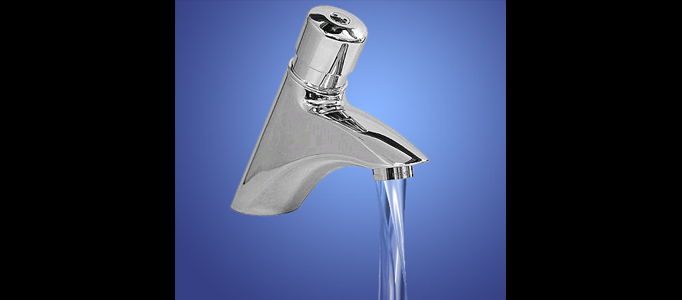
Realistic Water Running on Tap
Under Abstract Effect, Photoshop Tutorial
Through this tutorial, we will learn how to use a combination of photoshop filters to create a realistic effect of water running from a tap, simply by adding the above water’s layer to a picture of a tap.
Create Convincing Watercolor Effects Using Photoshop
In this tutorial, it is going to show you how to create some awesome watercolor effects for images. It is always a good effect to emphasize the image. In this, you can use the same idea and change into the way you want.
Magic, Fire, Light & Others in Photoshop
In this tutorial, it will demonstrate you 6 short chapters to create magic, fire, light, skin texture, deamons & blood and gore. It will give you the basic ideas to further develop your own creation with these effects.
Transform an Image into an Abstract Scenery
There are various ways which can stand out your image. Apart from adding extra objects or adjust the color or lighting, you can also consider to transform the image into some kinds of abstract sceneries. More importantly, the process is not difficult at all.
Design a Colorful Spectrum Effect
In this tutorial, it will display you how to design a colorful spectrum effect in Photoshop. It is always nice to design something like cartoon character with the colorful spectrum background. Using the photoshop brushes, you can design the spectrum in the way you want.
Make a Realistic Star Field
In this tutorial, it is going to show you how to create a realistic star field. Firstly, you need to initiate it with a background in black. Then you can create a the stars. To make this in a realistic way, you have to put more effort as there will be lots of photoshop techniques involved.
No Pattern Jumper Effect
This tutorial will show you how to create a light effect similar to NoPattern’s Jumper Poster. At the end it will show you how a technique like this can be used in a variety of different ways to make stunning images. There are many different ways to create this effect, this time, the Color Dodge and Burn Tools is used.
Create Special Color Effect in Photoshop
This tutorial will present you how to create special color effect in photoshop. This effect is mainly created by brush. Therefore, a lot of brush setting and techniques will be involved. If you try to use different color, it may end up another good result.
Awesome Light Effect in Fireworks
In this tutorial, it will demonstrate you to create light effect in fireworks. To make this, the idea is simple, but nice. You can create one as logo or use as button. The color combination is changeable. You can make a different one by changing the colors.


