
Photoshop Lady
Your Favourite Photoshop Tutorials in One Place
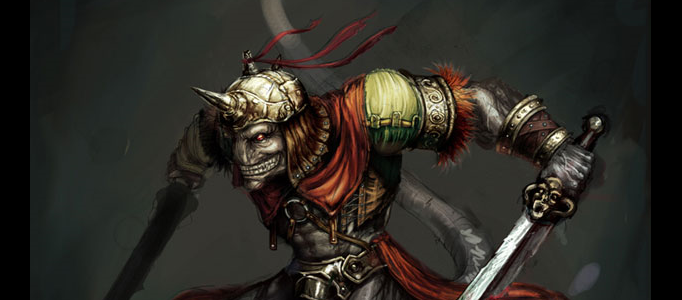
Making of the Beast
Under Drawing Effect, Photoshop Tutorial
In this “making of”, let’s share with you how to paint my “Beast” concept. There are many ways to achieve this. It will show you my favourite method. Hopefully it will be helpful for you.
Drawing a Cute Cartoon Character
It is fun to work on cartoon painting. However, it is very time consuming. To increase the effectiveness, it is good to refer more tutorials to learn techniques.
Design a Nice Personal Bicycle
If you were a bicycle lover, you may want to design your personal bicycle for yourself. To start with, it is very useful for you to refer some nice bicycle tutorial like this one. You just need to shape it and paint it.
Painting a Fantastic Female Cartoon Character
It is not easy to paint a high quality cartoon. Different designers would have different style and tactics to process their designs, therefore, it is good to refer more artworks to learn the painting techniques and adjustment of brushes.
Painting a Fabulous Lady Portrait
It is not easy to paint a human portrait. It requires a lot of techniques to add the shadow and lighting effects. Therefore, it is good to refer to more tutorials for the brushes settings and different techniques.
How to Create A Detailed Cassette Tape in Photoshop
In this step-by-step tutorial we will reinvent the tape … again! I will walk you through the process of creating a detailed audio cassette, from scratch, in Photoshop using shapes, layer styles and filters. Interested? Let’s start!
Create a Realistic Torn Paper Effect in Photoshop
This tutorial covers a few simple steps in Adobe Photoshop to create a realistic looking torn paper effect taking you on your way. Merge your layers and add the new paper texture to your designs, notice the tiny fibrous edges and subtle texture up close which together give effect a realistic paper look.
Drawing From a Reference Photo
First step is to create an “onion skin” by adding a white layer above the bottom reference photo layer and setting its layer opacity down a bit so that the image can be seen through the white layer. After doing a bit of work on the flame and wick layers.
Create an Universal Lighting Effect
The most beautiful lighting effect would be the light from universe, which contains various and colorful mixed characters. To design this, it is required different techniques to design with.


