
Photoshop Lady
Your Favourite Photoshop Tutorials in One Place
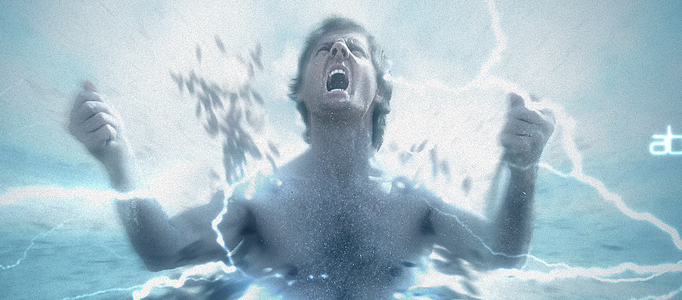
Fantastic Disintegration Effect in Photoshop
Under Photo Effect, Photoshop Tutorial
In this tutorial, it will show you how to create the disintegration effect using photoshop. Brushes and the blur filter will be mainly involved. It is really simple and you are able to apply this effect into different images by this sort of trendy style effect.
Create a Nicely Colorful Lighting Effect
It is always nice to add some colorful lighting effects for an image. The photo effect can be adjusted to match with the image’s pose such as adding lighting to your finger, then the whole image can be entirely improved.
Airbrushing – Natural Smooth Skin
In this tutorial, it will show you how to smooth the face in the photo. A lot of photoshop skills such as tuning the brightness & color adjustments are involved in this. You will find out more and apply the same idea for your photos.
Adding Colorful Bubble Effect for an Image
If you would like to create some quick effect to beautify the images, you can have a try on this colorful bubble effect for your images. You just need to trim out your image on a plain background, apply some bubble plus simple photoshop lighting and coloring adjustments, then we are done.
Create a Dramatic Scene for Spaceships in Galaxy
In this tutorial, it will show you how to create a sci fi artwork with spaceship, planets and galaxy. You’ll learn how to compose and manipulate some space elements together as well as blend them correctly and effectively.
Create an Elegant Lady in a Night Scene
Using combination effect, you can create whatever scenery you want. 15 different photos have been adopted for this scenery, so you can take a look how they adjust the color and arrange different images together.
Create an Elegant Island and Sky Scene in Photoshop
In this tutorial, this will show you the processes involved in creating this beautiful, fantasy-styled surreal ancient ruin and elegant island and sky scene in Photoshop.
The Robotic Horse – Turn Ordinary Animal to a Robot
Let’s learn how to transform a normal horse into robotic horse in Photoshop. To begin with this, you need to prepare a horse photo, and a car photo. After that, we can start to attach piece by piece on the horse. No special photoshop technique is required, you can try with other animals.
Making a Beautifully Submerged Road Scene
Simple objects can be formed a nice and special scene. A road, whale and ocean can be combined into a single scene using photo manipulation. Creating an underwater scene is not a hard, all you have to do is use some water textures, brushes and blend all the different stock images used.


