
Photoshop Lady

Your Favourite Photoshop Tutorials in One Place

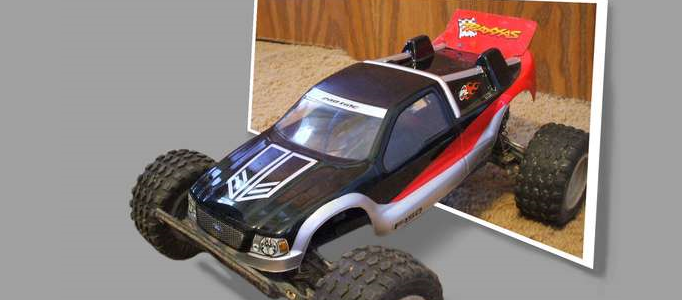
Creating a 3D effect with image editing software

Under ,

Here’s how to make a neat effect to make it look like the subject of a photo is popping out of the background. This can be done with Photoshop. After few steps, your subject is now popping out of the picture!

Creating Old Paper With Custom Brushes

Creating Old Paper With Custom Brushes

Sometimes, it is nice to create a personal brushes to do your art works as your time can be saved. To begin with, a plain white piece of paper will be taken, folded it in fours and left it in my pocket for a few hours. Next you need to scan the paper using the Grayscale setting on my scanner.

Transform a Lady Image into Cartoon

Transform a Lady Image into Cartoon

Do you want to create a cartoon image for yourself? You can use your photo to transform your image into a cartoon character mainly by Photoshop blending options. You can also design your character with different styles such as changing its hair and skin colors.

Using Ink Effect to Form a Fantastic Painting

Using Ink Effect to Form a Fantastic Painting

Any picture can be a good source to form a beautiful artwork, as long as you choose a right effect to apply to. This tutorial will show you how to transform a picture into a nice ink painting.

Create a Fabulously Imaginative Scenery

Create a Fabulously Imaginative Scenery

Different people would have different imaginative scenes. Here this scene is the combination from moon, flower, path and a mountain. The tactics are the fusion of their colors so as to mix different pictures together.

Turning your Image into a Color Mixtures Photo

Turning your Image into a Color Mixtures Photo

In this Photoshop tutorial, it will show you the steps to create a unique Photo Manipulation via Mixture of Ice and Fire Textures. Along the way, it will show some interesting ways to manipulate texture via image adjustment tool and free transform tool.

Create Cool Neon Effects

Create Cool Neon Effects

This tutorial will show you how to use warping, layer masks and simple colour tweaking for a high-tech look that’s out of this world. It is nice to apply this effect to your favourite photo.

How to Turn Humdrum Photos into Cinematic Portraits

How to Turn Humdrum Photos into Cinematic Portraits

There are a plethora of ways to treat a portrait for a myriad of uses, but that is for another feature. Let’s tackle adding drama or a cinematic quality to a regular, humdrum portrait.

Create a Super Fire Effect for a Car

Create a Super Fire Effect for a Car

To add a motion to a object, it is necessary to add some other elements. To present a car to be on running, you can add some fire to emphasize the speed like this tutorial.