
Photoshop Lady

Your Favourite Photoshop Tutorials in One Place

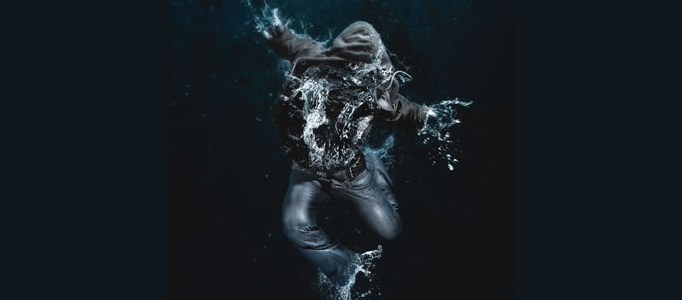
Create Amazing Photomontages

Under ,

In this tutorial, itshows you how to make a splash, blending two very different images to create this amazing underwater effect, complete with a dissolving figure of a man. At the end, the last adjustment is to draw focus to the centre by blurring the edges a little.

Please Login Before Adding Tutorials to Your Favourite List
Generate a Fantastic War Scenery

Generate a Fantastic War Scenery

How to design a proper war scenery? explosion, soldiers or bomb would be common elements to be used. Great and realistic explosion would be the key element when you carry out the combination of different pictures for your war scene.

Create an Attractive Background for your Image

Create an Attractive Background for your Image

To turn your image to be attractive, the easiest way is to design a nice background to match with. The background can be very simple. Simple shapes and effects can turn your image completely different.

Ink Effect for a Portrait using Photoshop

Ink Effect for a Portrait using Photoshop

If you fed up of color painting, you can have a try on this ink effect for your painting works. This is mainly done through color adjustment such as curves, level adjustments etc. Using a suitable paper for texture, a nice ink portrait can be done.

Design a Liquefied Traditional Car

Design a Liquefied Traditional Car

To specified and beautify your car, except changing the car color or adding some shining effect, you can add some special effects such as liquefy it with simple background.

Photo Manipulation – Multi Sceneries Combination

Photo Manipulation – Multi Sceneries Combination

Photo manipulation can allow you to combined different sceneries together to form a funny piece of artworks. Put a sky on a human head sitting on a grass field can turn out to be a nice piece of imaginative artworks.

Glass Blasting Effect for 3D Object

Glass Blasting Effect for 3D Object

When you would like to add some new effects for your image, you can have a go on this glass blasting effect. This is mainly done by adding the texture layer and change it like broken glass. After the colour adjustment, your image is like to be isolated by a layer of glass.

Create a Natural Coastal Scenery for a Style Lady

Create a Natural Coastal Scenery for a Style Lady

If you love the natural environment and would like them to show on your pictures, you can swap your indoor pictures with your favourite natural backgrounds. It is just required to arrange the prepared pictures together and apply photo combination effects

Making a Special Human Portrait under a Tree Background

Making a Special Human Portrait under a Tree Background

In this tutorial, it will show you how to create this special human portrait using Photoshop and some stock photos. The process is simple however it does take time to adjust the details.