Photoshop LadyPhotoshop Lady
About
  1. Home
  2. /
  3. Photoshop Tutorial

A Quick Way to Apply Retro Effect

February 18, 2026
Photoshop TutorialPhoto Effect
A Quick Way to Apply Retro Effect

How can you make your photo to be special in a minute? You can change it using retro effect in a quick way using curve function mainly. This effect can be applied in different kind of photos especially for old style photos.

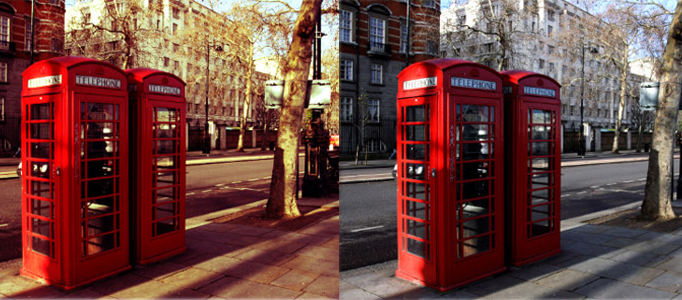
Simple Way to Apply Retro Effect
Simple Way to Apply Retro Effect L
PreviousHow to Create Your Own Traveling Brochure in PhotoshopNextCreate a Shiny 3D Snooker Ball in Photoshop

Related Articles

Create a Manipulated Snowing Scene

Create a Manipulated Snowing Scene

Making a Beautiful Meteor Scene

Making a Beautiful Meteor Scene

Making of a Natural Harmony Scene

Making of a Natural Harmony Scene

Drawing a Fantastic Castle under the Moon

Drawing a Fantastic Castle under the Moon

Recent Posts

  • Create a Manipulated Snowing Scene
  • Making a Beautiful Meteor Scene
  • Making of a Natural Harmony Scene
  • Drawing a Fantastic Castle under the Moon
  • Making a Wonderful Hawk in Photoshop
Photoshop Lady

Photoshop Lady

Top Graphic Content and Most Advanced Stock Image Search Engine

FB

Quick Links

HomeAboutPrivacy PolicyTermsContact

About Photoshop Lady

Your trusted source for expert guides, reviews, and insights. We help you make informed decisions with thoroughly researched content.

Expert-reviewed content
Updated regularly

© 2026 Photoshop Lady. All rights reserved.
