
Photoshop Lady
Your Favourite Photoshop Tutorials in One Place
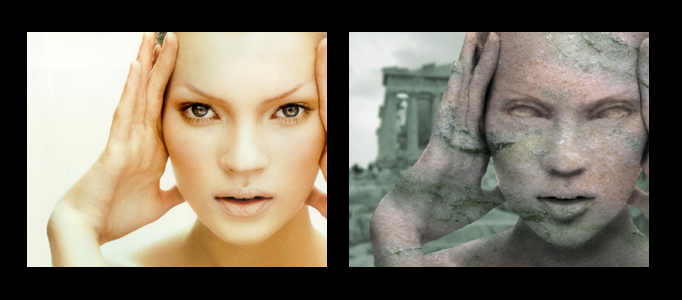
Turn Your Image into Statue
Under Photo Effect, Photoshop Tutorial
In this tutorial, it will show you how to turn your image into a statue. To create this, you are required to prepare 2 photos. One is your image, another is rock. Using photoshop, it is very amazing to do such combination.
Ink Effect for a Portrait using Photoshop
If you fed up of color painting, you can have a try on this ink effect for your painting works. This is mainly done through color adjustment such as curves, level adjustments etc. Using a suitable paper for texture, a nice ink portrait can be done.
Create an Elegant Lady in a Night Scene
Using combination effect, you can create whatever scenery you want. 15 different photos have been adopted for this scenery, so you can take a look how they adjust the color and arrange different images together.
Great Color Adjustment for a Lady’s Image
Color adjustment skills are very useful especially when you are doing Photos combination. To mix your image with different backgrounds, you have to adjust your photo colors. Here will show you some skills to transform a normal image to be a cold scene.
Create Amazing Photomontages
In this tutorial, itshows you how to make a splash, blending two very different images to create this amazing underwater effect, complete with a dissolving figure of a man. At the end, the last adjustment is to draw focus to the centre by blurring the edges a little.
Create a Dramatic Planet in Photoshop
Sometimes, you may find it difficult to make a planet since the land and cloud are very irregular. And this tutorial, you can learn how to create a nice planet in a professional way.
Using Ink Effect to Form a Fantastic Painting
Any picture can be a good source to form a beautiful artwork, as long as you choose a right effect to apply to. This tutorial will show you how to transform a picture into a nice ink painting.
Create a Special Underwater Living Nature
To create something special, you can create a special environment for different animal or species in the sky or under the sea. This tutorial will show you to create some sea species inside a wine bottle.
Smoothing & Softening Edition for Image
In this tutorial, it will reveal you how to edit a photo and make it into a high quality photo. To begin with, you need to remove unwanted object from the photo. Then the object will be edited to become more grant and elegant by adding the color on the fore part of the face.


