
Photoshop Lady

Your Favourite Photoshop Tutorials in One Place

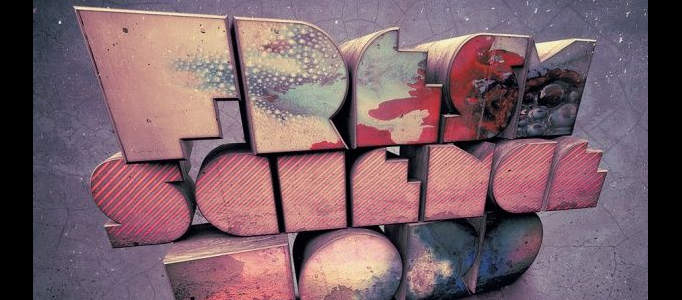
The New Way to Create Super 3D Text

Under ,

You have to download the tutorial. In this tutorial, it shows you how to create super 3D text in Photoshop. To begin with, you need to create the 3D text. Then, put the special texture for the text. It may not be necessary to follow this tutorial exactly, you can change it into the way you want.

How to Create an Awesome Burning Text Effect

How to Create an Awesome Burning Text Effect

In this tutorial, it will show you simply create an awesome burning text effect in photoshop. It is based on the real fire photo plus a rusty photo backgrounds. Using easy combination techniques, the nice text effect can be formed.

How to Create Killer Metallic Text

How to Create Killer Metallic Text

In this tutorial, it will show you how to design “Killer Metallic Text” as shown on the thumbnail. To create it nicely in a quick way, you have to be familiar with using layer blend mode to color burn to adjust the text effect.

Create a Silver Style Text Effect

Create a Silver Style Text Effect

There are various text effects on the internet. To create an outstanding one, it is uneasy. This style text is created mainly using layer style functions. You can design your own text effect based on similar procedure plus your adjustment.

Create a Fabulous Roping Text Effect

Create a Fabulous Roping Text Effect

To initiate your greatest design, your idea have to be unique and fabulous. The design does not need to be complicate. Using simple techniques, you can wrap and change the shape of your rope to form a nice text.

Reflective Liquid type

Reflective Liquid type

This tutorial will show you on creating metal type abound online, as do variations on simple liquid effects.Tutorials on creating metal type abound online, once you have an idea of how different techniques fit together in a piece.

Metal Text Tutorial

Metal Text Tutorial

This tutorial will show you how to get a really metallic chrome effect on our text, using curves and other features in Photoshop. There are several variables such as the curves input that can make quite a difference.

6 Quick’n’Dirty Photoshop Text Effects

6 Quick’n’Dirty Photoshop Text Effects

In this tutorial, it will show you how to make 6 different effects using just layer styles. But, we just focus on the golden text. It uses an Outer Bevel on top of a fat Stroke to create the highlights. Then when we place the other layer on top they come together to make a lovely gold effect!

Impressive Text Effect – Word in an Explosion

Impressive Text Effect – Word in an Explosion

You may be fed up with the normal text art and font. It is also not easy to find one to suit for your site style. Explosion effect for the text can match with varies style of content. You can base on the original design to develop your own creation.