
Photoshop Lady
Your Favourite Photoshop Tutorials in One Place
Displacement Water
Under Photo Effect, Photoshop Tutorial
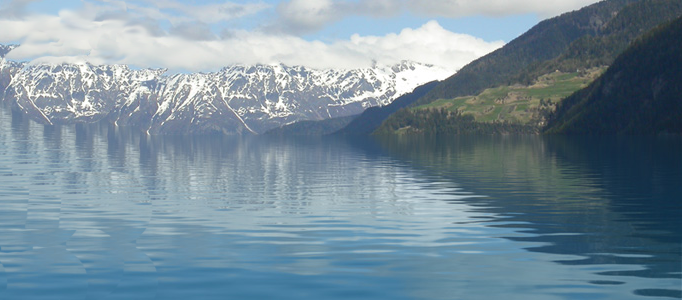
Creating a realistic water surface in Photoshop is quite a challenge because it is the distorted reflection of the surroundings that makes the water look liquid. The displace filter is an excellent tool for making this distortion. Now it really looks like water. Notice that the layer mask is also distorted because it is linked to the layer. This causes the reflectivity to change with the angle of the surface.
Create an Awesome Smoky Skull in Photoshop
This tutorial is going to present you the tricks to make smoke look like a skull. This technique has a variety of outcomes and works well with water, clouds and a whole bunch of other stuff.
Create a Nice Movie Flyer
To prepare a movie quality’s flyer, it really takes lots of preparations such as lots of different photos. Then you can arrange how movie scene to be. Once the background is fixed, then you can arrange whoever to be the main character in your flyer.
Enhance Your Ad Designs with 3D Splashes
In this tutorial it will show you a creative process. The workflow for creating the splashes involves taking photographs of thrown paint. In the final, you can add anything you want to your advertisement design. You can add a logo and some text in the image you want.
Create a Mobile Phone Ad Design
In this tutorial, it is going to show you how to manipulate a combination as a Phone ad. You will be able to experience how to paste different images to match the background products.
Create a Realistic Grass Cutting Machine
To create a realistic scene, you need to formulate a realistic background to match with. Some flying grass has been created around the machine in order to form the machine motion.
Devil’s Eye
In this tutorial, it will explain how to make eyes look more sinister, And remember this is coming from a begginer.This tutorial is aimed at the begginer (like myself) so they can more fully comprehend and understand.
Photo Manipulation – Lady Swimming in the Sea
Simple photo manipulation can allow you to form different extraordinary scenery. You can prepare few images such as a lady, ship and sea. Then, You can form a wonderful lady swimming scenery. The idea is how to cut and paste the images and adjust color and light afterwards.
Turning your Image into a Color Mixtures Photo
In this Photoshop tutorial, it will show you the steps to create a unique Photo Manipulation via Mixture of Ice and Fire Textures. Along the way, it will show some interesting ways to manipulate texture via image adjustment tool and free transform tool.


