
Photoshop Lady
Your Favourite Photoshop Tutorials in One Place
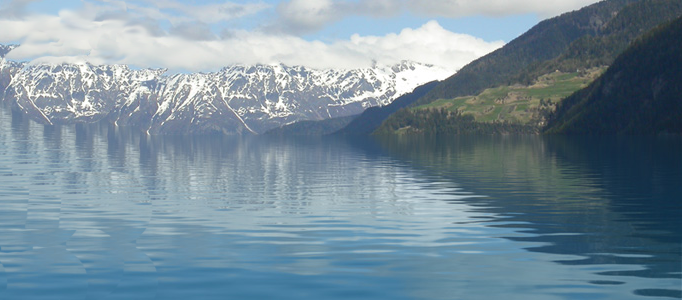
Displacement Water
Under Photo Effect, Photoshop Tutorial
Creating a realistic water surface in Photoshop is quite a challenge because it is the distorted reflection of the surroundings that makes the water look liquid. The displace filter is an excellent tool for making this distortion. Now it really looks like water. Notice that the layer mask is also distorted because it is linked to the layer. This causes the reflectivity to change with the angle of the surface.
Special Smoke Effect for an Image
Great effect does not have to be complicate. This smoke effect can be done in few steps. The shape of smoke can be changed to suit for different kind of images. This effect is suitable for presentation of some special image e.g. god.
Snail Race Photo Montage
This is a funny photo manipulation about the snail racing. In this tutorial, it is going to show you how to extract the images from few photos and generate the combination as this.
Create an Amazing Light Beam Surrounding a Lady
Are you bored to look at your pictures? if yes, you can take a look at this tutorial. Then, you will be able to add some lighting effects or a simple light beam that would make your image much better as it can increase the overall attractiveness.
Seamless compositing in Photoshop
In this tutorial, you will learn the idea of combination for different images. It is really a good tutorial. As the author did not use any complex tricks or skills to make this, but selection of a few of great images to make this composition.
Making a Different Hair Style in Photoshop
To try different hair style, it may not be necessary to go to saloon. You can try different hair style using Photoshop. You can use this techniques to put on different hair color, hair style or clothes on your image. This tutorial will teach you how to dye your hair or make a new hair look properly and quickly.
Design a Typographically Human Image in Photoshop
How to make your personal picture to be special? This tutorial will show you how to do that. To make your photo to be special, just turn your picture to be typographic. The color and the text are entirely up to you and advance photoshop skills are not required.
Instant Photo To Oil Painting Action
In this Adobe Photoshop tutorial, you will learn how to take a photo and make it look like an oil painting, which is a popular and fun thing to do with Photoshop. At the final, “Instant Photo To Oil Painting” effect is now complete, which means Photoshop to stop recording the action.
Create a Dramatic Scene for Spaceships in Galaxy
In this tutorial, it will show you how to create a sci fi artwork with spaceship, planets and galaxy. You’ll learn how to compose and manipulate some space elements together as well as blend them correctly and effectively.


