
Photoshop Lady
Your Favourite Photoshop Tutorials in One Place
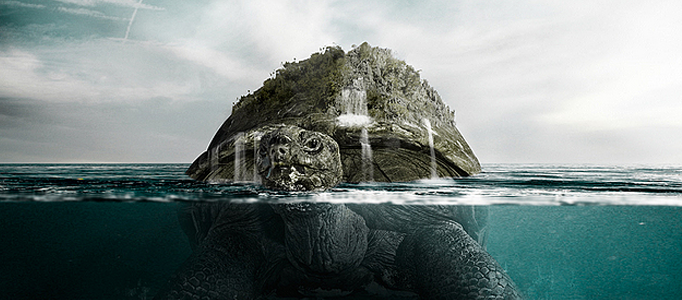
Create a Turtle Swimming in the Ocean
Under Photo Effect, Photoshop Tutorial
To create something in the water, you have to adjust your object opacity and play around your layers. As long as you can be familiar with these skills, you can carry out different mixtures for your objects such as sky, water and your turtle or others to form your imaginative scene.
Create Amazing Photomontages
In this tutorial, itshows you how to make a splash, blending two very different images to create this amazing underwater effect, complete with a dissolving figure of a man. At the end, the last adjustment is to draw focus to the centre by blurring the edges a little.
Create a Super Powerful Effect on a Human Hand
Lots of movies would use CG or computer technology to turn them to have super powers such as generating fire or electricity. Using simple photo manipulation effect, you can add whatever power you like into your photos.
Hair Highlights
In this tutorial, it will teach you the steps of highlight someone’s hair and if you want a dramatic makeover in your photographs in just few minutes, Then this tutorial is really help for you.
Pure an Energetic Photomanipulation
This is a tutorial for advanced/experienced users. The effects are complex and therefor I can’t go into detail on every single keystroke you have to make. Very well, let’s get started then!
Design Red Light Grass Field for a Lady
Using different normal photos plus some light effects, you can form an extraordinary scenery. To start, you need to prepare simple images e.g. grass field, sky and a lady. Then you cut & paste and put them together. Of course, you can choose any other combinations as you like to form your own artwork.
Create a Dramatic Impact to a Planet Scene
If you are star wars lover, you may wonder how the designer to get on the massive planet impact scene. It looks very sophisticated. However, you may do it less than an hour with this guideline tutorial.
Create a Beautiful Natural Soft Sea Light Scene
In this tutorial, it is going to show you how to create a very nice soft sea light scene by few pictures. These pictures form a very nice combination. You do not really need to have a professional photoshop skill, but the skills to look for good pictures.
Impressive Scenery Creation – Soul Flying out of an Angel
Lots of you would like to create your own angel image. Using photo combination method, you can cut and paste your prepared images such as pigeon and clouds plus applying some lighting and coloring effects to form this impressive scenery.


