
Photoshop Lady
Your Favourite Photoshop Tutorials in One Place
Adding a Great Gloomy Effect on Images
Under Photo Effect, Photoshop Tutorial
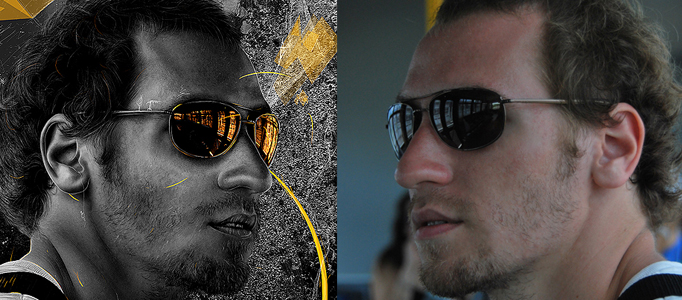
There are many ways to improve or change your image’s style. Adding the gloomy effect is one of the best method to improve your image properly. It is not effectively only turning down the overall image’s brightness, so it is a good idea to add some lights on, such as adding light/reflection on the glass.
Making a Colorful Scenery in the Ocean
Some of fantastic scene exists nearby you and some also appear inside water. If you are ocean lover, you will be admired of some ocean scenes. You can use ocean as your background and design something interesting inside to form your own artwork.
Create a Fantasy Forest in Photoshop
In this tutorial, it will give you an idea to create a magical fantasy touch to a forest. To begin, you need to prepare few pictures including animals, girl and a nice forest. Then you can start to do the combination and adjust the color.
Create a Destroyed City Scene using Photoshop
Except adding good effects into the existing pictures, Photoshop designers would like to produce sort of special scenes such as producing something to be destroyed. In this tutorial, you will have a chance to learn how to turn the city to be destroyed.
Fantastic Photo Transformation – Super Goggy Castle
This tutorial will explain how to make nice castle from a several photos in photoshop. The techniques are not difficult, you just need to follow the steps as mentioned. You can use the same idea to apply for different creation.
Memorial Style Picture Transformation
Some memorial images need to have memorial effect. When you have some pictures from long time ago, you want them in a memorial style. You can use this tutorial’s idea to transform them into an old style.
Develop a Gloomy Scenery for your Image
Different motions need different background to match with. Take weather as an example. Sunny could mean you are happy. Raining or gloomy sky could mean you are not in the mood.
Create an Universal Background for a Lady
Whatever portrait needs a nice background to match with. It is always a difficult exercise to lots of designers because it is an important task to turn your portrait to be outstanding.
Create a Dramatic Fire and Smoky Scene in Photoshop
This tutorial is going to present you to create a dramatic fire and smoky scene on a human face. Through photo combination effects, you can combine different natural scenes into a single scene. These combination techniques could be applied to many areas such as fire scene.


